- Our active membership is picking up again. As always, a large portion of our population is "silent" in that they focus on their books and don't get involved with the community discussions. This population is hard to measure, but I think it's the most important group that we have.
- Some old faces are coming back from wikibreaks. As the semester ends (for students) or as the seasons change (for working adults) people who used to be very busy in real life suddenly find themselves less so. Of course, new groups of people are going to find summer to be their busy time, and they will temporarily disappear until fall.
- We've got a new bureaucrat nomination, which is a relatively rare occurrence on en.wikibooks. Our "newest" bureaucrat was promoted back in April 2007, so I think it's high-time we had some fresh blood added to the mix.
- SUL has increased our account-renaming load considerably, and we've created a dedicated page where such requests can be made. This is probably only a temporary measure, until the SUL account-conflict frenzy has died down.
- Despite problems with copyright violations (a number of candidates were deleted) the new logo discussion for Wikibooks is continuing. There still seem to be some problems that will need to be worked through, however, so we aren't trying to follow any kind of strict timeline now.
- We've been working on our desired custom FlaggedRevs configuration, and even though discussion is spread out all over creation, we're slowly coming to consensus on some of the outstanding details. Hopefully, we can reach agreement on the last few details and put in our bugzilla request soon. Being able to flag a particular stable revision of a book is going to be a big help for us to "sell" our books to teachers who need things to stay calm in order to use a book in their class.
Wednesday, June 11, 2008
Wikibooks update, Week of June 9
Wikibooks has been slowly picking up lately, resurrecting itself from the slump we've been in for a few months now.

Tuesday, June 3, 2008
SUL Mania
en.wikibooks, like many other projects, is feeling the heat from the SUL-inspired usurpation mania. It seems I can't shake a stick without hitting a usurpation request somewhere. En.wikibooks has a page for all "administrative assistance". This covers everything from reports of vandalism, requests for rename, behavior problems, etc. We used to have multiple dedicated message boards, but these were all relatively low traffic, and admins hated having to keep them all on their watchlists. So, a while back, we merged all these pages into the single administrative assistance page. Now, we have a convenient single-point-of-contact where people can get all sorts of help from administrators.
This system works fine (and is a model of efficiency!) under normal use, but with the incoming wave of SUL name conflicts, we've become swamped. People post requests on the noticeboard. When they feel like we aren't responding fast enough, they post to our talk pages as well. I'm having to perform several renames every day, and it's wearing on my good nature. After all, I'm here to write books, not perform millions of renames. Plus, my time on wikibooks is limited each day, and I would like to spend that time writing.
I sent a message to our other three bureaucrats saying a few things:
This system works fine (and is a model of efficiency!) under normal use, but with the incoming wave of SUL name conflicts, we've become swamped. People post requests on the noticeboard. When they feel like we aren't responding fast enough, they post to our talk pages as well. I'm having to perform several renames every day, and it's wearing on my good nature. After all, I'm here to write books, not perform millions of renames. Plus, my time on wikibooks is limited each day, and I would like to spend that time writing.
I sent a message to our other three bureaucrats saying a few things:
- I wanted to create a sub-page for rename requests. This might only be a temporary thing, but it would help to streamline things, and keep the administrators noticeboard free from rename-related clutter. I have just created this page this morning.
- I think we need new bureaucrats. We only have 4, and not all of them are models of activity. Of course, a lot of our admin staff have been less active lately (we're in a bit of a seasonal slump right now). Either way, I think it's time we got some new blood into the mix.
- We needed to standardize some things. At the moment, we don't have pesky "rules" and "procedures" governing when and how a bcrat performs a rename or a usurpation. We leave this up to the best discretion of our bureaucrats. I generally like this state of affairs (it beats the nightmare of having to draft policy, heaven forbid), but a standard and efficient way to get this work done might be worthwhile. We still won't draft up a policy for it, but i would like to come to some general agreements between the bcrats nonetheless.
Monday, May 26, 2008
Disaster: Logo Copyvio
There has been a bit of a disaster this weekend with the Wikibooks logo selection process. Logo option D, my personal favorite and one of the apparent front runners, was found to be based on a copyvio.
Some of the proposed variants are dissimilar enough that they might not be considered copyvios. However, I'm no expert on this and would like to invite a second opinion from people in the community. The question is, are any of the proposed logo variants in this family dissimilar enough to be considered "safe"?
If not, we have a real problem on our hands. The logo selection process has gotten this far without noticing that one of the favorites was a copyvio. Could there be others hidden in the pack as well? Also, there have been some allegations that logos in the Wikijunior discussion are copyvios as well, although I personally can't confirm this.
We might be in a bad enough position here that we have to declare this whole discussion moot. I would hate for that to be the case, but it's better to stop now if we are running into problems like copyvios and the like.
Some of the proposed variants are dissimilar enough that they might not be considered copyvios. However, I'm no expert on this and would like to invite a second opinion from people in the community. The question is, are any of the proposed logo variants in this family dissimilar enough to be considered "safe"?
If not, we have a real problem on our hands. The logo selection process has gotten this far without noticing that one of the favorites was a copyvio. Could there be others hidden in the pack as well? Also, there have been some allegations that logos in the Wikijunior discussion are copyvios as well, although I personally can't confirm this.
We might be in a bad enough position here that we have to declare this whole discussion moot. I would hate for that to be the case, but it's better to stop now if we are running into problems like copyvios and the like.
Monday, May 19, 2008
Utah's Open Highschool
Textbook-l received an interesting email from Brianna Laugher about a new "Open High School" in Utah. Brianna frequently sends interesting information and news to that list, and might be one of the most active people on it. Unfortunately, textbook-l is an oft-unused communications medium.
Anyway, I haven't done any digging yet to see if there is truth to this story (I have no particular doubt that it is true). If anybody has more information about Utah's open high school, or information about what educational materials they are going to be utilizing, I would love to hear about it. If we could find a way to get Wikibooks' foot in the door there, that would be awesome as well.
Anyway, I haven't done any digging yet to see if there is truth to this story (I have no particular doubt that it is true). If anybody has more information about Utah's open high school, or information about what educational materials they are going to be utilizing, I would love to hear about it. If we could find a way to get Wikibooks' foot in the door there, that would be awesome as well.
Wednesday, May 7, 2008
Logo Discussion: Come and Vote!
It's stage 2 of voting at the Wikibooks logo discussion, and there are some awesome logos to be picked from. The best part is that many of the logos have new and interesting color schemes, far cries from the gray-meets-blue scheme (Wikinews, Wikisource, old Wikibooks) or the red-green-blue scheme (commons, wikispecies, meta) that the other projects use.
During this stage of the vote, logos are broken into "families" of similar images. Right now, we are trying to pick the best individual logo from each family to compete in the final stage. Here is what I want everybody to do:
On a side note, I'm becoming concerned about the Wikijunior logo selection process. It isn't drawing a lot of attention, and people don't seem to be too enthusiastic about the available logo candidates. I propose that we abandon the second discussion, and derive a Wikijunior logo from the winning Wikibooks logo. This will help to add continuity between the two projects. Plus, many of the Wikibooks logo candidates are significantly higher then most of the Wikijunior candidates. There are a few gems in the Wikijunior runnings, but none of them are gathering much public support so far. If anybody has any comments or opinions on this matter, please let me know ASAP. I would hate to pick a "winner" for WJ that nobody likes, just because too few people said they disliked it.
During this stage of the vote, logos are broken into "families" of similar images. Right now, we are trying to pick the best individual logo from each family to compete in the final stage. Here is what I want everybody to do:
- Go to [[m:Wikibooks/Logo]]
- Under the heading "Surviving Logos", there are multiple images. Each image corresponds to a subpage where discussion about that logo is happening. Here is a list of the subpages:
- Current logo, and variants
- Iconic book-in-circle (almost-winner of the last logo selection process)
- Iconic W-and-book in a circle
- Colorful stylized textbook
- Book with a world above it
- Golden Puzzle Book
- Wikimarkup Book
- Bookshelves
- Book with pages fanned out
- Stylized Book
- On each subpage, pick the logo that you like the best and comment on it.
On a side note, I'm becoming concerned about the Wikijunior logo selection process. It isn't drawing a lot of attention, and people don't seem to be too enthusiastic about the available logo candidates. I propose that we abandon the second discussion, and derive a Wikijunior logo from the winning Wikibooks logo. This will help to add continuity between the two projects. Plus, many of the Wikibooks logo candidates are significantly higher then most of the Wikijunior candidates. There are a few gems in the Wikijunior runnings, but none of them are gathering much public support so far. If anybody has any comments or opinions on this matter, please let me know ASAP. I would hate to pick a "winner" for WJ that nobody likes, just because too few people said they disliked it.
Wikimedia2pdf Tool
Textbook-l received a notice this morning from the team at blogpaper.com about a new tool that they've been working on: wikimedia2pdf. Apparently the tool was originally titled "Wikibooks2pdf" because of it's focus on creating PDF versions of existing multi-page wikibooks. However, it seems that some changes have been made to allow creating PDFs from Wikipedia as well. I'm not sure about all the details about how this works, so I'm going to spend some time playing with it today or tomorrow.
I tried to make a quick PDF this morning for a new book I've been working on, but the formatting came out a little strange. I didn't have time to really play with the settings, and I'll try it again later hoping for better results.
The website also includes several pre-made PDF versions of books that you can look at. Specifically, they seem to have already made PDFs of all our featured books. I took a look at the PDF version of [[Control Systems]], a book that I wrote most of and the only book that I've authored to become featured so far. I know that Control Systems is about 250 pages long (at least when I created the PDF manually using my own software), so I was surprised to see that the version from Wikimedia2pdf was over 1350 pages! The algorithm used by this tool appears to be a little bit naive. Control Systems has 4 "print versions", pages into which the rest of the pages in the book are trancluded. In a sense, a "print version" is like a book-on-a-single-page. Wikimedia2pdf transcluded the entire copy of all 4 print versions into the PDF it created. In essence, the PDF contains 5 copies of the book, back to back. What would be very cool here would be to provide a list of all the pages that the tool finds, and ask the user to check or uncheck pages which do not belong in the final PDF (like print versions, meta-data pages, etc). If this issue gets sorted out, Wikimedia2pdf will be a very cool tool for us to use.
I tried to make a quick PDF this morning for a new book I've been working on, but the formatting came out a little strange. I didn't have time to really play with the settings, and I'll try it again later hoping for better results.
The website also includes several pre-made PDF versions of books that you can look at. Specifically, they seem to have already made PDFs of all our featured books. I took a look at the PDF version of [[Control Systems]], a book that I wrote most of and the only book that I've authored to become featured so far. I know that Control Systems is about 250 pages long (at least when I created the PDF manually using my own software), so I was surprised to see that the version from Wikimedia2pdf was over 1350 pages! The algorithm used by this tool appears to be a little bit naive. Control Systems has 4 "print versions", pages into which the rest of the pages in the book are trancluded. In a sense, a "print version" is like a book-on-a-single-page. Wikimedia2pdf transcluded the entire copy of all 4 print versions into the PDF it created. In essence, the PDF contains 5 copies of the book, back to back. What would be very cool here would be to provide a list of all the pages that the tool finds, and ask the user to check or uncheck pages which do not belong in the final PDF (like print versions, meta-data pages, etc). If this issue gets sorted out, Wikimedia2pdf will be a very cool tool for us to use.
Tuesday, April 29, 2008
Visual Book Designer
I've been writing and maintaining a set of javascript tools or "gadgets" to help facilitate the creation and organization of books. By adding in some AJAX functionality, these scripts are able to automate, or semi-automate some common tasks for new editors. One of my older tools that I called the "Book Designer Gadget" was useful for outlining and designing a new book. You would type in a list of pages, one per line, and the gadget would create all the necessary wikitext for the table of contents page in your book. It would also do things like help assist you in creating basic navigation templates for your book, and properly categorizing your new book.
I decided to give the Book Designer Gadget a major overhaul, and I've created a new "Visual Book Designer" tool that should be even easier to use and more powerful. I would like to talk about that tool a little bit here, because I feel like it's a great prototype for the kinds of tools that Wikibooks is going to need in the future to help attract a new generation of technically un-savvy authors. This new gadget is completely visual, and it doesn't require any technical expertise to use.
To install and use the gadget, there are three easy steps:

Everything you see here can be clicked on, and many options can be changed. If we click on the title "New Book", we can change it:

 The rename function performs a quick AJAX page request to determine whether the page exists or not. You are not allowed to create a new book with the same title as an existing book.
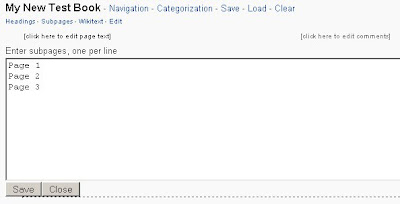
The small links below the book title, "Headings" and "Subpages" are the most important. These are the buttons that allow you to construct your outline. Clicking either "Headings" or "Subpages" will open a box where you can list the names of page headings or subpages, respectively. I'll demonstrate with subpages since they are the most important. Click the "Subpages" button, and enter a list of pages that should be added to your table of contents, one per line. Click save when you are done adding subpages to your outline:
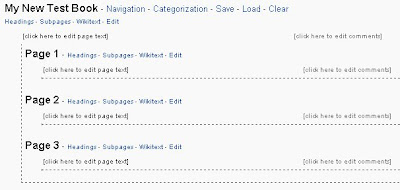
You will notice that on each subpage, we have the option to add sub-subpages, and more headings. In this way, you can easily create books using a variety of hierarchies, like "Book/Page", "Book/Chapter/Page", "Book/Chapter/Subchapter/Page", etc. Astute observers will notice little links for "Wikitext" under each page in our outline. Clicking on the "Wikitext" link will automatically generate the necessary wikitext to create that page:
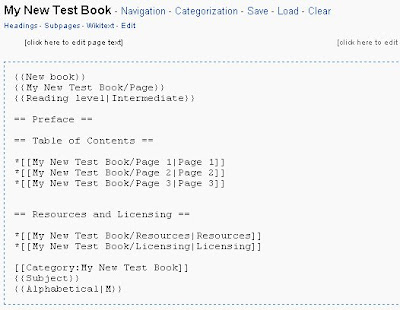 Notice that it adds all the necessary templates for organization, it adds necessary categories, and it creates links to all your subpages. From here, you can copy+paste the text to your page. Very astute observers will also have noticed a small link that says "Edit" under the subpages as well. On wiki, when I show you a button or a link that says "Edit", what comes to mind? Clicking on that link will open an embedded edit window, right here in the middle of the gadget, where you can edit the page in question automatically:
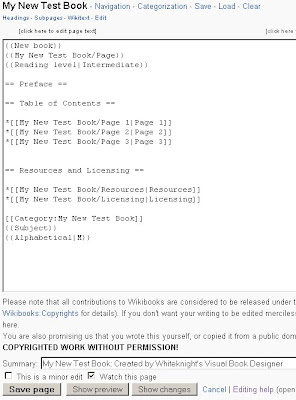
When you open the edit window, all the text and a handy summary are filled in for you. You can save or preview your edit just like you can in a normal edit window (because it is a normal edit window). You can do this for each page in your book too, not just the main page.
There are many more options that I won't discuss in detail here, but I hope that you get an idea of how useful a tool this is for new book authors. You can layout and design a book, following Wikibooks community best practices, without having to write a single character of wikitext. Here is a quick list of additional features:
I decided to give the Book Designer Gadget a major overhaul, and I've created a new "Visual Book Designer" tool that should be even easier to use and more powerful. I would like to talk about that tool a little bit here, because I feel like it's a great prototype for the kinds of tools that Wikibooks is going to need in the future to help attract a new generation of technically un-savvy authors. This new gadget is completely visual, and it doesn't require any technical expertise to use.
To install and use the gadget, there are three easy steps:
- Create an account on en.wikibooks
- Go to [[Special:Preferences]], and on the gadgets tab check the box "Whiteknight's Book Creator". This will install all my tools, including the Visual Book Designer automatically. No need to edit your monobook.js file at all, the gadgets extension does all the work for you.

- Go to the form at [[User:Whiteknight/Visual Book Designer]] to see and interact with the gadget.

Everything you see here can be clicked on, and many options can be changed. If we click on the title "New Book", we can change it:

 The rename function performs a quick AJAX page request to determine whether the page exists or not. You are not allowed to create a new book with the same title as an existing book.
The small links below the book title, "Headings" and "Subpages" are the most important. These are the buttons that allow you to construct your outline. Clicking either "Headings" or "Subpages" will open a box where you can list the names of page headings or subpages, respectively. I'll demonstrate with subpages since they are the most important. Click the "Subpages" button, and enter a list of pages that should be added to your table of contents, one per line. Click save when you are done adding subpages to your outline:


You will notice that on each subpage, we have the option to add sub-subpages, and more headings. In this way, you can easily create books using a variety of hierarchies, like "Book/Page", "Book/Chapter/Page", "Book/Chapter/Subchapter/Page", etc. Astute observers will notice little links for "Wikitext" under each page in our outline. Clicking on the "Wikitext" link will automatically generate the necessary wikitext to create that page:
 Notice that it adds all the necessary templates for organization, it adds necessary categories, and it creates links to all your subpages. From here, you can copy+paste the text to your page. Very astute observers will also have noticed a small link that says "Edit" under the subpages as well. On wiki, when I show you a button or a link that says "Edit", what comes to mind? Clicking on that link will open an embedded edit window, right here in the middle of the gadget, where you can edit the page in question automatically:
When you open the edit window, all the text and a handy summary are filled in for you. You can save or preview your edit just like you can in a normal edit window (because it is a normal edit window). You can do this for each page in your book too, not just the main page.
There are many more options that I won't discuss in detail here, but I hope that you get an idea of how useful a tool this is for new book authors. You can layout and design a book, following Wikibooks community best practices, without having to write a single character of wikitext. Here is a quick list of additional features:
- You can save a partially completed outline to a page on the wiki, and load it into the gadget again later.
- You can add your book to one or more subject categories by selecting from a convenient list. You don't need to know the exact name of the category, or the location of the bookshelf, or anything to make this work.

- You can create the necessary navigation templates, but picking from one of a small set of predefined alternatives. Once the template is created, you can modify it to your heart's content.
- You can add text to each page and each heading by clicking where it says "[Click here to edit page text]". The editor isn't as large as the regular page editor, and it doesnt have any of the normal editing buttons, but you can write a short blurb to get yourself started.
- You can add comments to the outline by clicking where it says "[Click here to edit comments]". Comments are visible to you on the outline, for making reminders and short notes, but are not visible in the book when you create it.

Subscribe to:
Posts (Atom)
